OSを最新版(MacOS 11.1)にアップデートしてから、初めてプリントをしてみようとしたところ、
印刷がエラーになりました。
例によってプリンタードライバーを再インストールしなければいけないかなと思って、
発売元のブラザーのサイトに行ってみました。
もともとこのプリンターは、今はインクジェットとかのほうが流行でしょうが、
だいぶ改善されたと思いますが以前は、用紙のにじみとか、インクジェットの詰まりとか、
毎度毎度のクリーニングとか、イニシャルコストは安いんですが
ランニングコストが高かったり面倒なこともあって、
思い切って単機能のモノクロレーザープリンターをあまり有名でないメーカー(失礼)の
中古製品を整備したものを買いました。
旧モデルは新品で¥22,000円ですが、中古製品は¥8500円でしたし、
それほど頻繁に使いませんし故障しづらいレーザーのものを買ったと言う経緯があります。
単機能ですから、スキャナーとかコピーとかはできません。
コピーの場合は一旦スマートフォンなんかで写真を撮ってそれを印刷するとかで対応しています。
自分の場合はそれでも充分用が足りますので。
さて、それでブラザーのサイトに行ってプリンタードライバーを見てみると、
旧式のモデルにかかわらず、プリンタードライバーMacOS11.1用のものが用意されていました。
さらに嬉しいことに、AirDrop (多分Bluetooth経由での印刷機能)も用意されています。
試しに両方ともインストールしてみました。
結果は、両方とも機能しました。
前のOSのバージョンでは無線(Bluetooth)での印刷が全くうまくできなかったのが
今回はUSBでなく(最初の設定はUSBケーブルをつないで設定したんですけど)
Bluetoothで無線で印刷できたのは大変嬉しい効果です。
実に快適な結果を得ることができました。
ブラザーも捨てたものではありません。
──────────
注文の詳細注文日: 2020年1月8日 (1個の商品)(旧モデル) brother
レーザープリンター A4 モノクロ JUSTIO HL-L2365DW
──────────
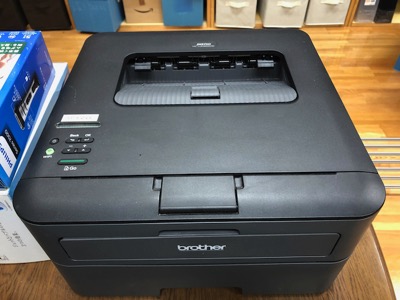
ブラザーレーザープリンター
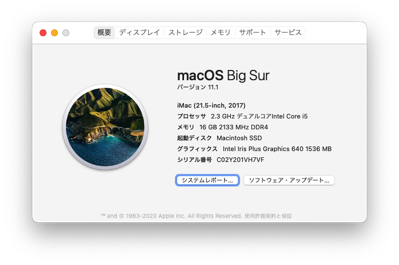
MacOS 10.1
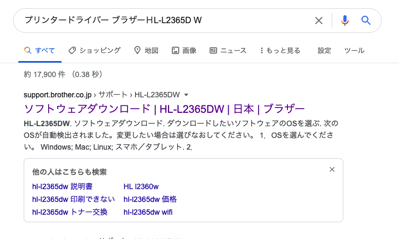
ググる
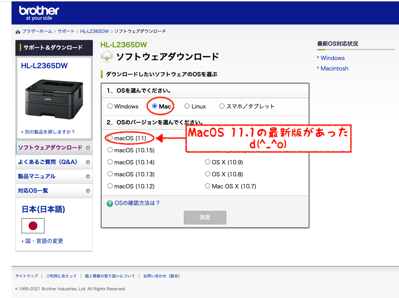
ブラザーサイト、プリンタードライバー
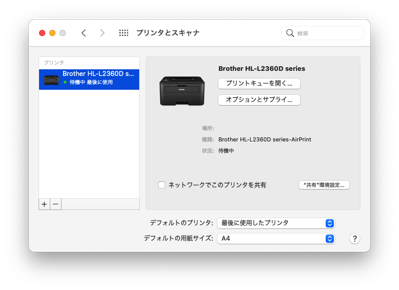
インストールOK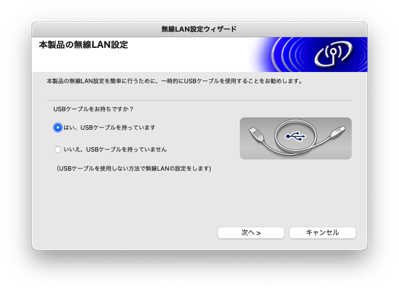
無線設定
ーーーーーーーーーーーーーーーーーーーーーーーーーーーーーーーーーーーーーーーーーーーー
I do not know whether it’s just me or if perhaps everyone else experiencing issues with your website.
It appears as though some of the text within your content are running off the screen. Can someone else please comment and let me know if this is happening to them too?
This may be a problem with my internet browser because
I’ve had this happen before. Kudos
Hey there just wanted to give you a quick heads up.
The words in your article seem to be running off the screen in Internet
explorer. I’m not sure if this is a formatting issue or something to do with internet browser compatibility but I thought I’d post to let you know.
The design look great though! Hope you get the problem
fixed soon. Many thanks
Hi there! This is my first comment here so I just wanted to give a quick shout out and tell you
I truly enjoy reading your articles. Can you recommend any other blogs/websites/forums that deal with the same topics?
Thank you!
Hurrah! In the end I got a webpage from where I be able to really get useful
facts regarding my study and knowledge.
It’s awesome to visit this web page and reading the views
of all friends regarding this post, while I am also zealous of getting experience.
Hi, I read your blog regularly. Your story-telling style is awesome, keep it up!
It’s going to be ending of mine day, but before end I am reading this enormous post to improve my experience.
For the students to review, Samacheer Kalvi Options for Class
9 can be found and are updated frequently.
Hey! I could have sworn I’ve been to this website before but after reading through some of the post I realized it’s
new to me. Anyways, I’m definitely happy I found it and I’ll be book-marking and
checking back frequently!
I got this web site from my friend who told me on the topic of this site and now this time I
am browsing this web site and reading very informative articles here.
Have you ever considered writing an e-book or guest authoring on other websites?
I have a blog centered on the same information you discuss and would
really like to have you share some stories/information. I know my readers would value your work.
If you are even remotely interested, feel free to send me an e-mail.
I have read so many articles or reviews regarding the blogger lovers except this paragraph
is genuinely a fastidious article, keep it up.
What you published made a great deal of sense. But, think
on this, what if you wrote a catchier title? I mean, I don’t want to tell you how
to run your website, but what if you added something that grabbed folk’s attention? I mean 【プリンター管理画面】レーザープリンターを無線印刷する | 趣味のためのMacに関するサイト is kinda boring.
You ought to look at Yahoo’s home page and watch how they create post headlines
to grab people to open the links. You might add a related video
or a related picture or two to get readers interested about what you’ve written.
Just my opinion, it could bring your website a little
bit more interesting.
Hi everyone, it’s my first pay a visit at this website, and post is truly fruitful in support of me, keep up posting such content.
My relatives always say that I am wasting my time here at net, but I know
I am getting knowledge everyday by reading thes fastidious articles.
I truly love your blog.. Very nice colors & theme.
Did you make this website yourself? Please reply back as
I’m attempting to create my own personal site and would love to learn where
you got this from or exactly what the theme is named.
Thanks!
This website truly has all the information I needed concerning this subject and didn’t know who to ask.
Hi there! Do you know if they make any plugins
to protect against hackers? I’m kinda paranoid about losing everything I’ve worked hard on.
Any recommendations?
Thanks for the good writeup. It in truth was a amusement account it.
Glance complex to far introduced agreeable from you!
By the way, how can we be in contact?
Howdy, i read your blog occasionally and i own a similar one and i was just curious
if you get a lot of spam feedback? If so how do you
protect against it, any plugin or anything you
can suggest? I get so much lately it’s driving me crazy so any support
is very much appreciated.
Have you ever considered writing an e-book or guest authoring on other websites?
I have a blog centered on the same topics you discuss
and would really like to have you share some stories/information. I know my subscribers would appreciate your work.
If you’re even remotely interested, feel free to send me an e
mail.
Hello, its nice paragraph concerning media print, we all know media is
a great source of data.
I am genuinely delighted to read this webpage posts which carries plenty of valuable information, thanks
for providing such data.
Wonderful blog! I found it while browsing on Yahoo News.
Do you have any suggestions on how to get listed in Yahoo News?
I’ve been trying for a while but I never seem to get there!
Cheers
It’s in point of fact a nice and useful piece of info.
I’m satisfied that you simply shared this helpful info with us.
Please keep us up to date like this. Thank you for sharing.
Thanks for finally writing about > 【プリンター管理画面】レーザープリンターを無線印刷する | 趣味のためのMacに関するサイト < Liked it!
You could certainly see your enthusiasm in the article you write.
The arena hopes for more passionate writers like you who aren’t
afraid to mention how they believe. Always follow your heart.
Because the admin of this web page is working, no uncertainty very quickly it will be famous, due to
its quality contents.
I have been exploring for a bit for any high-quality articles or blog posts in this sort of house .
Exploring in Yahoo I finally stumbled upon this web site. Reading this information So i’m
happy to express that I’ve a very just right uncanny feeling
I found out exactly what I needed. I such a lot for sure will make certain to do not overlook this website and give it a glance on a relentless basis.
This design is wicked! You obviously know how to keep a reader entertained.
Between your wit and your videos, I was almost moved to start my own blog (well, almost…HaHa!) Fantastic job.
I really enjoyed what you had to say, and more than that, how you presented it.
Too cool!
Your mode of explaining the whole thing in this paragraph is truly good, every one be capable of simply know
it, Thanks a lot.
you’re actually a excellent webmaster. The site loading pace is incredible.
It sort of feels that you are doing any distinctive trick.
Moreover, The contents are masterpiece. you’ve done a great job on this subject!
Heya! I realize this is kind of off-topic but I had to ask.
Does operating a well-established blog such as yours take a large amount of work?
I’m brand new to operating a blog however I do write in my diary everyday.
I’d like to start a blog so I can easily share my own experience and thoughts online.
Please let me know if you have any kind of recommendations or tips for brand new aspiring
bloggers. Appreciate it!
I am truly glad to read this website posts which consists
of lots of valuable information, thanks for providing these statistics.
For basic nationwide web optimization, FBM can perform keyword analysis and create
backlinks on your web site.
Exceptional post but I was wondering if you could write a litte
more on this subject? I’d be very grateful if you could elaborate a little bit
more. Appreciate it!
Hi to all, because I am genuinely keen of reading this webpage’s post to be
updated on a regular basis. It consists of fastidious material.
I quite like reading through a post that will make men and women think.
Also, thanks for permitting me to comment!
When someone writes an piece of writing he/she maintains the thought of a user in his/her brain that
how a user can understand it. Therefore that’s why this post is great.
Thanks!
Hi there! This post couldn’t be written much better! Reading through this post reminds me of my previous roommate!
He constantly kept talking about this. I’ll send this post to him.
Fairly certain he will have a very good read.
Thank you for sharing!
I would like to thank you for the efforts you have put in writing this website.
I’m hoping to see the same high-grade blog posts from you in the
future as well. In fact, your creative writing abilities has motivated me to get my own, personal site now
😉
I do agree with all the concepts you’ve introduced to your post.
They are very convincing and will certainly work.
Nonetheless, the posts are very brief for beginners.
May you please extend them a little from subsequent time? Thank
you for the post.
It’s nearly impossible to find knowledgeable people on this topic,
however, you seem like you know what you’re talking about!
Thanks
Thanks for a marvelous posting! I truly enjoyed reading it,
you could be a great author. I will ensure that I bookmark your blog and may come back someday.
I want to encourage you to continue your great writing, have a nice
evening!
Simply wish to say your article is as amazing. The clarity for
your put up is just great and i could suppose you’re knowledgeable in this
subject. Well with your permission allow me to snatch
your feed to stay updated with approaching post.
Thank you a million and please carry on the
rewarding work.
Its like you read my mind! You appear to know a lot about
this, like you wrote the book in it or something.
I think that you can do with some pics to drive the message home a bit, but other than that,
this is wonderful blog. A fantastic read. I will certainly be back.
For most up-to-date information you have to visit world-wide-web
and on the web I found this site as a most excellent web site for newest
updates.
Nice post. I learn something new and challenging on websites I stumbleupon everyday.
It will always be exciting to read articles from other
authors and practice something from their web sites.
Just wish to say your article is as amazing. The clearness in your
post is simply nice and i can assume you are an expert on this
subject. Well with your permission allow me to grab your feed
to keep updated with forthcoming post. Thanks a million and please continue the gratifying work.